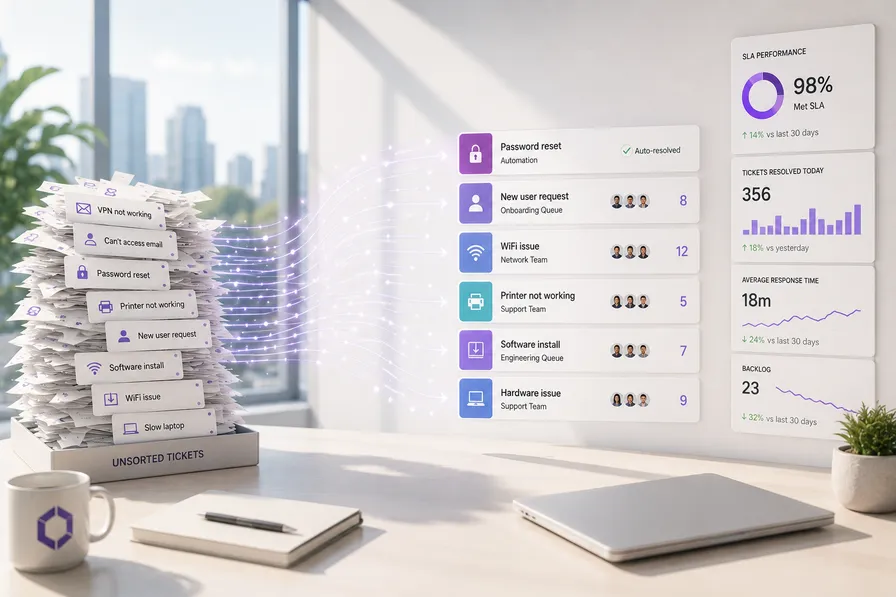
What this article covers: This guide explains what MSP ticket triage automation is, how it works in practice, and what to look for when evaluating a solution for a service desk. It is written for MSP Managing Directors and operations leads who are considering automating their triage process and want to understand the mechanics before making any decisions.
Every ticket that arrives at your service desk needs someone to look at it, decide what it is, work out who should handle it, and get it to the right place. That process takes time. Across a team handling dozens of tickets per day, it accumulates into a significant portion of your technical staff’s working hours spent on work that does not require their skills.
KLaunch places the cost of a human-handled ticket at ten times that of an automated one at comparable resolution quality. For UK MSPs, HDI benchmark data puts the fully loaded cost of a manually triaged ticket, once engineer interruption time and context-switching are included, at between £8 and £14 per ticket. At 500 tickets per month, that is up to £7,000 in monthly overhead attributable to process steps that carry no billable value: identity verification, client context gathering, severity assessment, category tagging, queue selection.
For a detailed breakdown of what manual dispatch actually costs in pounds per ticket, the post What Manual Dispatch is Actually Costing Your MSP covers the maths in full.
MSP ticket triage automation addresses this by handling those administrative steps programmatically, before a human engineer needs to touch the ticket at all.
Ticket triage automation is software that receives incoming support requests, analyses their content, classifies them by type and urgency, gathers relevant background information from connected systems, and either routes them to the correct engineer or resolves them directly, without requiring a human to read and sort each one first.
This is distinct from ticketing software itself. Your PSA, whether ConnectWise Manage, Autotask, or HaloPSA, stores and manages tickets. The triage automation layer sits upstream: it processes the incoming request before or as it enters the PSA, enriching it with supporting data and routing it intelligently rather than dropping it into a generic queue for someone to sort later.
A well-built triage automation system follows a consistent sequence. Each stage builds on the last, and the value compounds across ticket volume.
The result is that your team receives tickets that are already categorised, prioritised, and contextualised. The triage work has already been done.
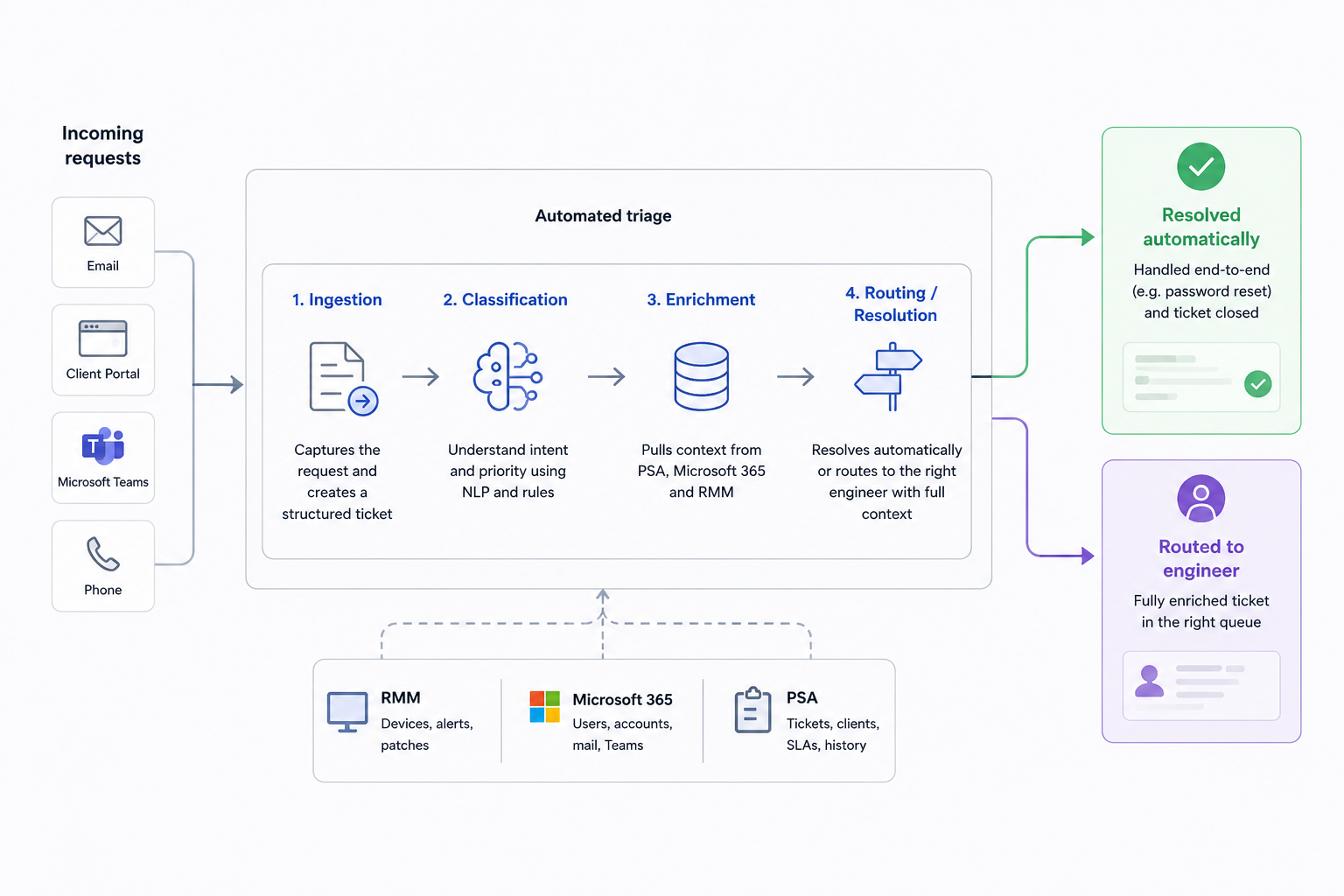
Not all triage automation tools are built with UK MSPs in mind. Several criteria matter and are best understood as a group rather than a checklist.
PSA integration is non-negotiable. The system must connect natively with your PSA and write back to it cleanly. Microsoft 365 connectivity is equally important in the UK SMB market, where M365 dominates. A triage system that can query Azure Active Directory, read user account status, and interact with Exchange and Teams gives your team far more background information than one operating in isolation. For password resets and account-related tickets specifically, M365 integration is what makes end-to-end automated resolution possible.
GDPR compliance and UK data residency are not optional for any system that processes client data. Look specifically for data residency within the UK or at minimum the EEA, clear data processing agreements, and a privacy-first architecture.
Transparent routing logic matters operationally. A triage system that routes tickets without explaining why creates a black box your team will not trust. Look for systems that show the classification reasoning, allow engineers to correct misroutes, and improve from that feedback. Configurable rules are equally important: your client base has specific SLA tiers, escalation paths, and named-engineer relationships, and a system that cannot accommodate those realities will create more exception-handling work than it saves.
| Evaluation Criterion | Why It Matters | Risk If Missing |
|---|---|---|
| Native PSA integration | Keeps ticket records clean and synchronised | Duplicate records, manual reconciliation overhead |
| Microsoft 365 connectivity | Enables automated resolution for account tickets | Reduced classification accuracy, no self-service resolution |
| UK data residency | Required under UK GDPR for data processors | Compliance exposure, client contract risk |
| Transparent routing logic | Builds engineer confidence in the system | Low adoption, manual overrides undermine ROI |
| Configurable SLA and routing rules | Reflects your real client structure | Exception-handling workload increases, not decreases |
The realistic expectation is a phased process. Understanding each phase addresses the operational concern that matters most to an MD running a live service desk: what happens if something goes wrong during rollout.
Your team typically notices the change as a reduction in context-gathering time rather than anything more dramatic. Tickets arrive with more information attached. Queues are more accurately organised. For senior engineers in particular, the benefit is fewer interruptions for requests that should never have reached them.
A realistic implementation timeline for a mid-sized MSP is several weeks from integration to live operation.
UK GDPR requires that personal data is processed lawfully and stored appropriately. Support tickets frequently contain personal data, including usernames, device information, and descriptions of user behaviour, which means any system handling them is a data processor under UK law. Your Data Processing Agreement with the software provider must reflect this.
Microsoft 365 is the dominant productivity platform across UK SMBs. A triage solution without deep M365 integration is missing the most important data source for contextualising tickets in your environment. Data sovereignty concerns have increased amongst UK MSP clients, particularly in legal, financial services, and healthcare-adjacent markets. Being able to confirm that client data does not leave UK jurisdiction is increasingly a procurement requirement, not a preference.
What is MSP ticket triage automation? It is software that processes incoming support tickets automatically, classifying them by type and urgency, enriching them with background information from connected systems, and routing them to the correct engineer or resolving them without human intervention where possible.
How much does manual triage cost per ticket? HDI benchmark data, applied to UK service desk wage rates and realistic engineer interruption costs, puts the fully loaded cost of a manually handled ticket at between £8 and £14. The full calculation, including what those savings fund in headcount terms, is covered in How Ticket Triage Savings Fund Two New Engineers.
Does triage automation integrate with ConnectWise? It should, and ConnectWise Manage integration is a baseline requirement for any tool being evaluated for use in a ConnectWise-based operation. Verify that the integration writes back natively to ConnectWise records rather than creating parallel data.
Is ticket triage automation GDPR compliant? Compliance depends on the specific tool and how it is configured. Look for UK data residency, a clear Data Processing Agreement, and architecture that does not transmit personal data to third-party services outside your legal jurisdiction without appropriate safeguards.
What does the payback period look like? At 500 tickets per month and a conservative per-ticket saving of £4 to £6, the monthly saving covers platform cost and begins funding headcount or margin within a single quarter. The observation phase generates the accuracy and volume data you need to make that case with your own numbers rather than industry averages.
The MSPs that automate triage this year will be competing on margin against peers who are still paying technical staff to read emails and assign queues manually. DaemonLayer is built specifically for UK MSP service desks, PSA-native, M365-connected, and designed around UK data residency requirements. If you want to see how triage automation would work against your actual ticket types and volumes, find out about the our pricing tiers here.
Kevin Wright
Co-founder & CEO, DaemonLayer
Kevin built and exited an IT services business before working in M&A and then as Operations Director at an MSP. He holds an MBA from the University of Manchester. He founded DaemonLayer to fix the coordination problems he watched erode engineer capacity firsthand.
Connect on LinkedIn →